Adobe CS3 Program Icons: Alphabet Soup on a Color Wheel (And What They Mean)

December 22, 2006

[Looking for the list of Adobe CS3 program abbreviations?]

Adobe Photoshop CS3 Beta Released

(A prelude.)

Photoshop CS3 Logo

Let’s start off by announcing Adobe has recently made Photoshop CS3 Beta available for download. It’s free as long as you have a valid Photoshop CS2, CS2, Production Studio, Video Bundle, or Web Bundle serial number and the final Photoshop CS3 version hasn’t come out yet. Another caveat: no tech support is available for the beta.

All the details are given on the Photoshop CS3 page, including download instructions and system requirements—at least 320 MB RAM and 64 MB video memory!

New Adobe Creative Suite 3 Program Icons

Adobe Photoshop CS2

Adobe has been known to change branding strategies every new version, particularly the logo and icon aspects. Take Photoshop for example. From versions 1.0 to 7.0 there was the ever-present eye in each of the whimsically conjured designs. But this was followed by a more nature-friendly feather concept starting with the two generations belong to the Creative Suite.

For CS3, though, Photoshop and practically every other member of Adobe’s Product line has adopted a drastically different icon scheme (mentioned here), sporting two letters of the product name on a soft-gradient-fill-ed square. The typeface details are in the postscript of this entry. The color of the gradient is the color the product is assigned to on the color wheel. In the case of Photoshop, it’s a nice, deep blue, around #2B75CC (according to ColorZilla).

The Alphabet Soup and The Color Wheel

The Periodic Table of Elements comes to mind—transformed into a color wheel using the polar coordinates filter! (Kidding.) Yes, it’s very disorienting.

Adobe CS3 icons

The general rule is, the first letter is bigger (capitalized) than the second. Compound words, e.g. PageMaker, use the first letters of the root words with the second letter in small caps. For simple words such as Flash, and yes, Photoshop, the second letter is in lowercase. However, just like the periodic table, not all elements are spelled in the same way (yes, I still remember why tungsten uses W: because it’s also called wolframium). Adobe Illustrator uses “Ai”.

I thought I’d list all of Adobe’s product names their corresponding shorthand here. This is based on the notes at the Flickr image uploaded by сdнarriѕoη (alternative by luxuryluke). Yes, I plan to update or upgrade this list once we have everything straightened out. Ones marked with asterisks are uncertain:

Adobe Product Names by Icon Shorthand
AE - After Effects
Ai - Illustrator
Au - Audition
Aw - Authorware
Br - Bridge
CF - ColdFusion
Co - Contribute
Cp - Captivate
Di - Director
Dw - Dreamweaver
En - Encore DVD
FB - Flex Builder*
FH - FreeHand
Fl - Flash
FM - FrameMaker
Fw - Fireworks
Fx - Flex
Gl - GoLive
IC - InCopy
ID - InDesign
JR - JRun/JobReady*
LC - LiveCycle
LR - LightRoom
PM - PageMaker
Pr - Premiere
Ps - Photoshop
RH - RoboHelp
Sb - Soundbooth
VC - Version Cue*

To mix things up even further, some icons do not follow the letters-only rule and have retained their old logos. This includes Acrobat, Acrobat Distiller Apollo, Connect (formerly Breeze), Device Central, Digital Editions, Extension Manager, Flash Player, Flash Video Encoder*, Reader, Version Cue, and a currently-unidentified icon.

Adobe’s CS3 Icons Are Troubling

Fu!

People have always been complaining about Adobe’s decisions with its branding strategy, but this will probably be the worst debate we will encounter. I probably won’t mind if only a few key products were modified, but it definitely felt awful seeing all those letters on a color wheel. While shortening words into two letters in typical chemical element fashion became a mini trend not too long ago, John Nack counters wants nothing to do with that.

One last point: if we wanted to design a ‘Periodic Table of the Elements’ we certainly have the capabilities to have done so. Our desktop brand system isn’t a marketing or advertising gimmick that we will toss out on the next rev, it’s a solution to real usability and identity problems and is something we can call wholly our own.
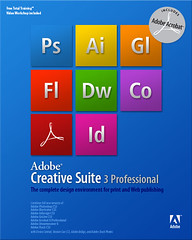
Adobe Creative Suite 3

But understanding and recall will be difficult in this context. There seem to be too few distinct colors for all of the Adobe software. And using nomenclature reminiscent of Chemistry and all the memorizing we had to do—instead of our previous way of associating images with respective Adobe programs—is also traumatic. That I thought of listing what all the abbreviations stood for (via сdнarriѕoη and other people’s contributions) in order to keep track of which one was which is alarming enough.

Here’s another good albeit humorous point: good icons are usually so good that their silhouettes also recognizable. But what do you get when you silhouette Adobe’s new icons? Trouble in the Dock, that’s what. I’m not an Apple geek but people are complaining those blocks are hardly recognizable once they’re zoomed out and tiny. Then again, others argue that because they’re so minimalist, they stand out!

'CrApPy'

Seriously though, I would have preferred it if Adobe stuck to the graphical look rather than the minimalist. It is always good to have an icon that piques your imagination much like a modern-day muse. “What would Andy Warhol say?

Worse, Adobe compromised. It was fairly inconsistent before but now it’s all the more obvious now that the Acrobat family kept the old logo, along with a few others.

Others ask: should we waste this much time kvetching about product icons when what we should be for or against is the quality experience an Adobe app gives us?

I did, because Adobe is a role model for all things (bright and) beautiful. They’re the company that has excelled in creating tools that make publishing so much cooler and easier to do. (Where are Corel and Macromedia now? No, this is not the place to insert the GIMP argument.) We don’t buy what others have dubbed as “lazy minimalism.”

See, Jason Santa Maria’s reasoning is just like mine.

Please Digg or oKs or Reddit this!

27 Comments

  1. Chap

    This is a mistake.

  2. damn, that is befuddling. this comes from a photoshop rookie, of course, mweheh.

  3. @Chap: Are you referring to the icon design? It’s just sad!

    @Corsarius: The color’s great and all, but two things: they made people dependent on color AND type. That’s not very “iconic”!

  4. I dunno - do you really think that a feather or flower better communicates the software? I have to say that I kind of like the look, maybe it could have been executed better, but at least it’s more macromedia than adobe. I always favored the former’s brand.

  5. @Mrad: I guess it’s a matter of taste, because I think a bunch of letters very alienating compared other artful figures. I do like the logos for Macromedia’s programs, but I think they’re different and better than these CS3 icons. :)

  6. [...] Let’s face it, everything is better when put in a 3D carousel. It’s so played out that it’s cool. This little Flash app contains an interactive 3D carousel of all of the new icons for Creative Suite 3. Many people have complained about them but I actually really like the simplicty of them. I mean how much more could they have done with the whole nature/flower concept? I like the whole elements analogy and think it is a nice change. You can click the image below to check it out. There are a couple of icons that are yet to be identified so let me know if you find out. I got most of my information about these from this blog posting. [...]

  7. [...] Or read more comments concerning the icons from this blog which was one of the first to deal with this issue. [...]

  8. I find the new icons very cold. There was a friendly creative feel to the CS2 icon set, and I really liked that. The icons simply look GOOD on my OS X dock. These big ugly starkly coloured icons are going to look nasty on there. I think Adobe are making a mistake. Okay in the scale of things application icons don’t mean that much, but with pretty operating systems like Tiger and Vista, this new branding seems a sad throwback to the uninspired techie-driven software brands of old… oh well.

  9. your’s is georgeous too ;)

    and i enjoy your article here :)

  10. FB really likes the icons!!! i hate them!!! stick to the graphic i tell ya!

  11. Adobe’i uus ikonograafia kriitikatules…

    Adobe Photoshop CS3 beeta on saadaval juba 20. detsembrist. Adobe’i tuntuima rakenduse lõplik versioon peaks koos teiste Creative Suite 3 toodetega ilmuma kevadel. Photoshop’i avalik beeta ilmus Adobe’i ajaloos esmakordselt, olles m…

  12. @ia: every logos is, in its essence, comprised of color, type and shape. what else do you want?

    i love them, and can’t wait to have an Adobe rainbow in my dock!

  13. It’s a matter of taste, Steve. Some people like me prefer the nature-type logos to the alienating, chemical symbol-wannabe logos. The color is also questionable. With so many Adobe products, you can’t just depend on a slight variation of color and type to tell them apart. That color wheel is crowded. And that decision was not very usability-friendly.

    Anyway, this argument will never end. Let’s see what Adobe will shock us with next.

  14. [...] Adobe uses new icons for their programs. [...]

  15. [...] Let’s face it, everything is better when put in a 3D carousel. It’s so played out that it’s cool. This little Flash app contains an interactive 3D carousel of all of the new icons for Creative Suite 3. Many people have complained about them but I actually really like the simplicty of them. I mean how much more could they have done with the whole nature/flower concept? I like the whole elements analogy and think it is a nice change. You can click the image below to check it out. There are a couple of icons that are yet to be identified so let me know if you find out. I got most of my information about these from this blog posting. [...]

  16. [...] Many people have voiced their opinions of likes and dislikes of Adobe’s approach to visually representing their products. However, after seeing the a larger role out of branded packaging it seems to make more sense. It’s almost as if Adobe had to go the route of breaking down their product icons to a very simple form — type, color and shape, part of the core of what Adobe deals with. It’s a lot of products that can work in tandem with each other in a variety of combinations. [...]

  17. [...] Of course I can’t help noticing how different the look and feel of the Creative Suite packaging is compared to its blocky though equally colorful icons. I knew Adobe was a lot more artistic than that. [...]

  18. Hi there, its going to back Director MX or “CS3″ ?

  19. [...] The CS3 program icons were sort of distracting. I still don’t think they’re as refined as the previous looks of Adobe/Macromedia products, or even the current product packaging and the whole Creative License campaign. [...]

  20. I have also made some CS3 replacement icons, but the difference between mine and all the other alternative replacement icon sets that I have seen so far is that my icons actually make use of icons, rather than the 2-letter “periodic table” style — so imagine a complete set of how Device Central and Acrobat, etc. currently look.

    http://www.archimediadesign.com/assorted  /cs3icons/

  21. [...] Via John Nack, The Flash Blog and Stellify. [...]

  22. JC

    I had a G4 scrubbed and loaded with the new CS3 basic suite. Now the machine is experiencing some latency issues and it takes about a minute just to open up some of the programs. My current machine has 1GB of RAM and 2 empty slots for more. Does anyone have any advice for me? Do you think if I got 1GB more of RAM that it would correct the latency issues? I also have Quark loaded on the machine. HELP!

  23. Jen Stewart

    On behalf of Aquent and the American Marketing Association, I’d like to
    invite you and your readers to join our upcoming (June 28th, 2007) free webinar featuring Chris and Jennifer Smith discussing “Accomplishing Critical Marketing Goals with Adobe® Creative Suite 3’s New Capabilities.”

    Chris and Jennifer Smith are the co-founders of the Aquent Graphics Institute , a subsidiary of Aquent . Since 1994, they’ve provided training, support, and consulting services to marketers, communications professionals and publishers. Chris and Jennifer have collectively authored over 20 best-selling Adobe-related books, including Adobe Creative Suite 3 for Dummies . Most recently, they developed much of Adobe’s internal training for the Creative Suite 3 launch.

    In this Aquent -sponsored webcast, Chris and Jennifer Smith of the Aquent Graphics Institute will share a marketer’s guide to Adobe Creative Suite 3. Specifically, they’ll highlight major enhancements made by Adobe and discuss how some organizations are already accomplishing critical marketing goals with these newly enabled capabilities. Given your audience, I think there’ll be a lot of interest in their advice.

    We’d also appreciate your help in spreading the word about Chris and Jennifer’s presentation. Perhaps you’d include us in your calendar or you’d like to interview one or both of them before or after the event? I’d be happy to arrange a phone or email interview with then to deepen your research.

    Register and get more info here:
    http://www.marketingpower.com/webcast384 .php

  24. [...] Adobe CS3 Program Icons: Alphabet Soup on a Color Wheel (And What They Mean)The new Adobe icons and brandingWhat’s up with the new Photoshop icon & branding?Adobe CS3 Icon 3D Carousel    [...]

  25. [...] blog post sheds alot of light on [...]

  26. Forget the icons, they are nothing compared to Adobe taking my Real Color Wheel painted in 1995 and putting their icons on it. It seems they want to switch from the their RGB color wheel to my RCW color wheel.

    I agree everyone should have this colorwheel because it makes the yellow-magenta-cyan more usable by artists, photographers, and graphic designers. Opposing colors will now mix to a neutral black, that is something that had never been done before. Yellow darkening to brown and cyan darkening to ult blue doesn’t happen by accident, it took a lot of original work and thinking to come up with it. I started with painting on location for 30 years matching natures color shadows with there mixed pigments. I followed the elements of color and the crystals they made, they matched and proved my color theory. My color theory, given freely to over 250,000,000 web viewers with this in the code. “This material copyright 1996 by Don Jusko. To reproduce any information for sale, you must ask permission!”

    If you are an artist, photographer, graphic designer or interested lawyer and want more information go to my website.

    Don Jusko
    http://www.realcolorwheel.com/colorwheel .htm

  27. [...] forward from the nature/plants theme.It makes things alot simpler, and easier to understand. This blog post sheds alot of light on it. Overall I like the Icons and think they are alot more simpler and [...]

Leave a Reply

Technology & Computers - Top Blogs Philippines